Posts

GIS5935 Week 4-- Networks: Network Analysis
Image
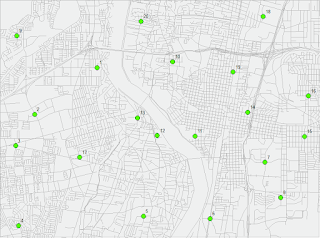
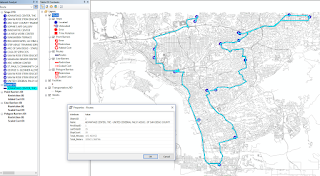
This week in Special Topics in GIS was our first week looking at Networks, we focused on Network Analysis specifically. There were two parts to the lab, the first was a set of introductory exercises to help us refresh on how to create a Network using ArcMap's Network Analyst extension tools as well as review the elements that make up a functioning Network. For the second part of the lab we modified data for provided Network. First I created a new Network Dataset with Turn Restrictions by adding RestrictedTurns and Streets feature classes to the data frame. A point shape file of Facility locations was used for Stops. There were a total of 19 Stops that resulted in a total time of 105.5 Minutes (1.76 hrs). For the final portion of the lab, I created  a second Network Dataset which included a Traffic Model. The Traffic model is enabled in the Network setup wizard and allows your network to use historic traffic data for an analysis. The map below displays the new route and...

GIS4035 Module 4-- Ground Truthing and Accuracy Assessment

Image
This week, we revisited our aerial LULC Classification analysis of Pascagoula, Mississippi in order to determine accuracy using ground truthing methods. I created a random sample pattern of points in a new shape file and placed them throughout my previous LULC Classification map layout. Then performed a ground truthing assessment of land features using Google Street Map view online. Accuracy percentages resulted in 57% accurate points and 43% false points. Looking back, I believe I could have done better in my initial assessment of features in the aerial photograph.

GIS5935 Week 3-- Data Quality : Assessment

Image
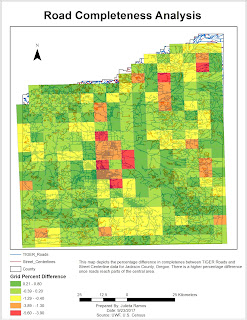
In this assignment, we learned how to determine the quality of road networks by determining their completeness by comparing total lengths of two different road data sets. Using Calculate Geometry, in kilometers, I was able to determine that TIGER roads were more complete by comparison. Total TIGER Roads length came out to be 11,383 km, while Street Centerlines were 10,805.8 km. I actually had a more difficult time organizing this analysis than initially expected. The method that seemed to work was to first clip the two roads to the grid shape file. From there run the Intersect tool on both road clips to the grid, separately of course. Then gathered the length info from each road DBF files and added it to a new excel sheet to included GRIDCODE, FID, and Lengths. In this new sheet, I then calculated the percentages using the provided formula of: % difference = (total length centerlines – total length TIGER) / total length centerlines * 100% Then I added this sheet to the TOC ...

GIS4035 Module 3-- Land Use Land Cover Classification

Image
There was a lot of content to digest this week in Photo Interpretation and Remote Sensing. We delved into what Land Use and Land Cover actually represent, and Land Use Land Cover (LULC) classifications, reasons, definitions, and its process. It was very interesting learning about this system's process, the technology required for recording data, and how the recording of data for each type of main feature differed from one another. I hold a personal interest in this field, so it was a fascinating read. The lab required to create a land use/land cover map from a provided aerial photograph by applying recognition elements to LULC classification and be able to identify various different features. I was able to identify 12 unique features. Unfortunately, I ran out of time and did not get to identify all of the features in the aerial photograph.

GIS5935 Week 2-- Data Quality: Standards

Image
For this second week into standards in regards to Data Quality, we had to perform a horizontal accuracy assessment using NSSDA protocol methodology in order to determine the accuracy of two different street map data sets based off the same area in Albuquerque, New Mexico. Using two different street sample data sets: City data (ABQ_Streets) and ESRI street map data (StreetMapUSA). I started things off by creating a network data set for each street shape file in ArcMap. Next, in order to be mindful of the study area and attempt to make sure the points met the criteria, I created a fishnet with 2x2 columns/rows which creates 4 quadrants within the study area. Working off the Junction layer for ABQ_Streets, I selected 20 intersection test points as suggested. It was encouraged to use the City data set due to it being more accurate. Then comparing the selected test points, I selected matching test points for the StreetMapUSA data set. The third and final data set needed for this lab w...

GIS4035 Module 2-- Aerial Photography Basics & Visual Interpretation of Aerial Photography

Image
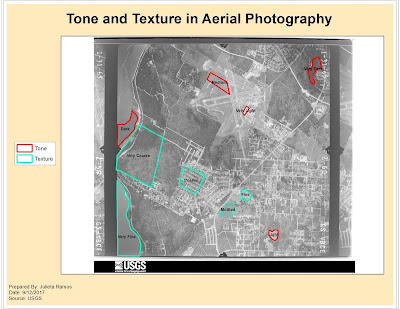
For this module's lab, we observed three different aerial images for three different purposes: first served to identify tone and textures, second was identifying physical features, and third was interpreting color. Only two maps were required for the first two exercises. The objective for exercise 1 was to be able to identify texture and tone in an aerial photograph. For both elements, it was required to observe at least 5 different tones and textures (i.e. light, very light, dark, coarse, etc.). The objective for exercise 2 was to learn how to identify features according to shape and size, shadows, pattern, and by association. I think I did a good job after zooming in and examining the aerial image closer to try and identify features better. Shadows became very helpful in singling out possible trees or street posts which then helped with associating other features nearby.

GIS5935 Week 1-- Data Quality: Fundamentals

Image
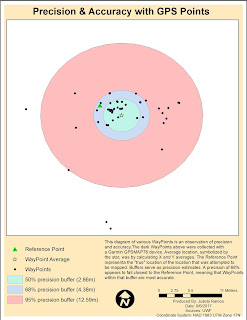
For our first lab in Special Topics in GIS we looked at what accuracy and error mean in the context of Data Quality. In this first part of the lab I calculated the average WayPoint based off WayPoints gathered from a Garmin GPSMAP76 unit in order to find the precision of a specific location. Average location was determined by calculating X and Y averages. In the diagram below, the Reference Point represents a the "true" location of the location that was attempted to be mapped. Buffers of 50%, 68% and 95% precision were also calculated to observe the precision of the data. For the second part of the lab, we had to calculate error metrics for another and larger set of GPS points and create a Cumulative Distribution Function graph showing the error distribution for all metrics.

Orientation Assignment - Own Your Map

Image
As part of Orientation week for this course we reviewed some basics from the Introduction to GIS course. We were given a template map of Florida counties. We had to create a map for the UWF campus in Escambia County using data provided by FGDL which included: Escambia County, major roads, and rivers. Roads and rivers were clipped to fit the county shape. The font titles, County map colors, data frame background colors and frames, symbols for the UWF campus, Interstate, and River were all customized. I have not had to create a map in ArcMap recently, so this was a nice refreshing exercise to get back in practice.

Module11- Sharing Tools

Image
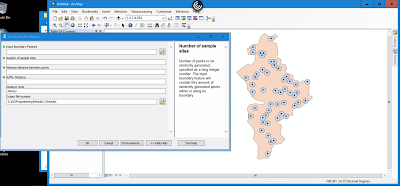
This module served very much as a review in Script Tools. The assignment required that we edit an existing script to work with data provided, edit parameter details for the tool to become more user friendly, then finalize it by embedding the script into the tool and creating a password for it.  This is the final outcome of tool. It was supposed to create randomized points with buffers within the feature boundary.  Below is a flowchart displaying basic steps taken to create and share this Script Tool. ...and that's a wrap! This was the last module for GIS Programming course. I still have the final project to complete for next week. While it's not the end yet, there is a sense of accomplishment in having made it this far in a course I thought I would perform terribly in. All modules focused on Python fundamentals were very challenging for me but also the most rewarding once I figured things out. It was really helpful being familiar with how certain tools wo...

Module 10- Creating Custom Tools

Image
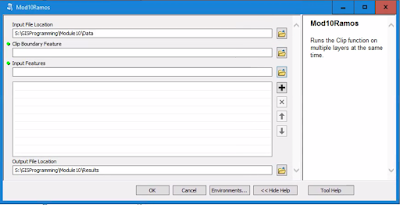
This week we reviewed some Script Tool fundamentals. The lab required that we modify a stand alone script to perform a multi clipping task in ArcMap. First, I tested the script in PythonWin to make sure it worked. Then created a new Toolbox in ArcMap, added a new Script Tool, and linked the stand alone script here in order to use it. Next was modifications to the Script Tool parameters and script to make it work in ArcMap. Below is an image of the opened Script Tool displaying both input and output locations, meaning that the new parameters were working as expected. After making some code adjustments to the script and editing variable values to point to the desired parameters for Output Boundary Feature and Input Features. The tool dialog box below displays a successful task completed listing all the shape files being clipped in the process. There are definitely more steps in the process of creating a new custom tool for ArcMap while the script may be simpler. Bel...

Peer Review Assignment #2

This peer review takes a look at A new GIS-based model for automated extraction of Sand Dune encroachment case study: Dakhla Oases, western desert of Egypt found in the UWF Journal's resources database. Sand dunes are considered a threat for roads, water sources, agriculture, irrigation networks, and infrastructures in the Dakhla Oases in the western desert region of Egypt. The focus of this paper is to develop a new GIS based model for automated extraction of sand dune encroachment using remote sensing data to assess the rate of sand dune movement. The paper is a group effort amongst staff from the Department of Remote Sensing and Landscape Information Systems (FeLis) at Freiburg University, Germany, and the Land Use Department at the National Authority for Remote Sensing and Space Sciences (NARSS) in Cairo, Egypt. This particular case study was published in Volume 15, Issue 1 of The Egyptian Journal of Remote Sensing and Space Science in June 2012. The data provided for this c...

Module 9- Working with Rasters

Image
Last week we focused on vectors, this week we looked at working with rasters in Python. This lab assignment required to write a script that does the following tasks: creates a raster output file that identifies areas with specific parameters (slope, aspect, and land cover type). The flowchart to the right displays simplified steps taken in the script. Using two rasters, for landcover and elevation, the final raster highlights areas that suit the following criteria: Forest landcover consists of classifications 41, 42, and 43 Slope falls between 5-20° Aspect ranges between 150-270° Below is the script output: and the final raster image:

Module 8- Working with Geometries

Image
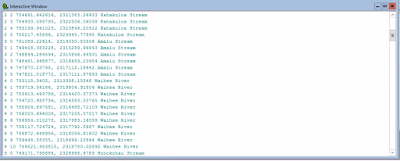
This week's exercises demanded hands on writing multiple scripts that worked with geometries in a shape file and text file in order to produce a poly line. I've never done this type of script, so it was really interesting going through the steps to find points, find lengths, and define an area using just a script and coordinates in a text file. For the lab, I wrote a script that creates a new text file in which it writes the Object IDs for the vertices in a shape file and the coordinates. To be honest, I had some troubles working backwards in the retrieval of coordinates part as well as writing all the vertices into the text file. Below is part of the script output.

Module 7- Exploring & Manipulating Spatial Data

Image
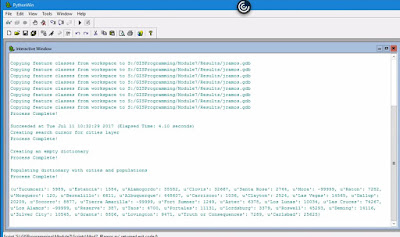
This week we will learn how to read, update, and manipulate data using lists, dictionaries, cursors, and loops. The lab itself was well designed in breaking down all steps necessary which consisted of the following tasks.: Create a new Geodatabase. Set a current workspace which includes Data output folder. Created variable fclist to get a list of all feature classes in the data set. Created a for loop to copy over all features from the workspace to the new Geodatabase. Created a Search Cursor for cities layer filtering city names and populations that met the criteria. Created an empty dictionary and populated it with cities and their populations using a for loop. Added "Process complete!" messages to each step as validation that a step had been completed. Below is the output for all steps completed. The most difficult step was creating a  for  loop for the last requirement in order to populate the dictionary. I was going down the wrong path for a while...

Module 6- Geoprocessing with Python

Image
In this module we learned how to perform geoprocessing tasks using Python and the syntax for using tools and toolboxes from ArcMap. The lab required to perform three geoprocessing tasks: Add XY coordinates to a shape file. Create a buffer of 1000 meters for the shape file. Dissolve the buffer into a separate feature. Each task also had to print the messages form every tool using the GetMessages() function.  Below is a simple model of what was done in the script. This interactive window shows the script's final output messages.

Module 5- Geoprocessing in ArcGIS

Image
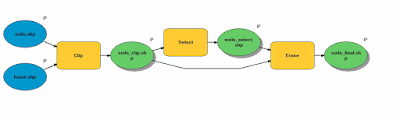
This week we practiced several types of geoprocessing techniques, including batch processing, making new tools with ModelBuilder, and converting those tools into Scripts and Script tools. For the lab part, we had to create a model and a script tool to perform two geoprocessing tasks: first to run a query of soils with a specific attribute, and then to erase those soils and produce a final soil shape file. The final model clips, queries, then erases and produces three new shape files (soil_clip, soil_select, and soil_final) as seen below. The final outcome on the map looks like this: The Soil shape file has been clipped to display Soils that fall within the Basin shape file. Soils with the attribute 'Not prime farmland' have been selected and removed from the final Soil shape file. 

Peer-Review Assignment #1

This first peer-review looks at  Geoprocessing tool to model beach erosion due to storms: application toFaro beach (Portugal) . The paper is on a geoprocessing tool used to model beach erosion, specifically applied to Faro beach in South Portugal. This tool would assess beach erosion due to storms using two computational modules in order to determine whether the geoprocessing tool would be useful in helping predict storm impact along Faro beach. Its final conclusion was that the tool does work after several testing procedures to assure that the tool could be relied upon. It appears to be original work published on the Journal of Coastal Research, Special Issue 64, 2011 by faculty from Center for Marine and Environmental Research (CIMA) at Algarve University and University of Lisbon in Portugal. The science and testing procedures described were clear and concise. Sufficient data information is provided to follow along their methods of testing the geoprocessing tool. The pape...

Module 4- Debugging and Error Handling

Image
In this module we explored numerous methods for debugging which included examining error messages, the addition of print statements, and practiced more selective commenting out of code. We also reviewed approaches to basic error-handling, coding errors in Python and ArcGIS geoprocessing. The lab required to debug 3 different scripts: The first required to fix the errors in the script. In the end, it would print the field names for a shape file. The second script also had errors to fix and would produce a list of layers in an AcMap file. The final script also had errors and consisted of 2 parts. Instead of fixing them I needed to include an exception for it to print the error in Part A and then continue to run the script in Part B.

Module 3- Python Fundamentals Part 2

Image
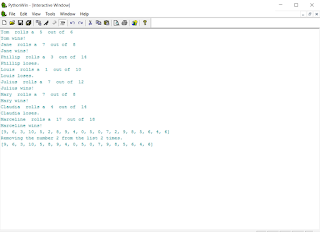
Continuing with fundamentals, we delved into learning to use conditional statements to perform different actions in differing situations, for and while loops to repeat processes, and also get our hands on practicing how to identify and fix errors in Python. For this lab, I completed an unfinished Python script for a dice game, corrected errors in it, then added two new blocks of code requiring to print statements for certain conditions and remove a number from a randomly generated number list. Below is the final outcome.

Module 2- Python Fundamentals Part 1

Image
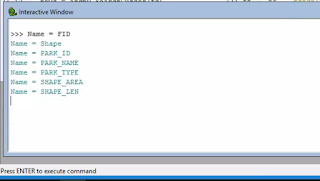
Continuing Python fundamentals this week, we get our hands on with Functions! We learned how to assign string variables, had to use methods and functions to manipulate strings and lists, and finally perform a basic math function. It started by creating a string using my full name-- stringName = "Julieta Ramos" Then creating a list by using the split method-- listName = stringName.split(" ") After printing my last name, a new variable called lastNameLen was created to find the length of my last name. This was done by counting the letters in my last name using the function len. Below is the work involved to achieve this lab's objective. The examples and basic exercises in lecture really helped getting some of those simple functions into memory. While thinking of how to write these functions, I was also mindful of how to minimize the amount of entries to reach the desired result.