Posts

Showing posts with the label GIS5935- Special Topics in GIS

GIS5935 Module 15-- Dasymetric Mapping
Image
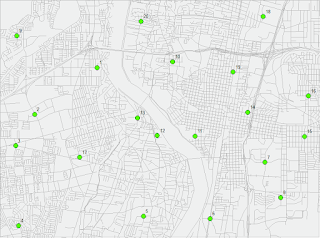
For this last module, we explored methods in Dasymetric Mapping. Dasymetric Mapping is "the process of disaggregating spatial data into finer units of analysis using ancillary data to help refine locations of population of another phenomena." This type of analysis basically helps look at where populations of a certain demographic(s) are concentrated within a set of boundaries. It may sounds like a fairly straight forward process, but it turned out more complex than expected... The first two parts of the lab were great exercises and stepping stones, per se, in introducing us to the process and mind set of actually perform a dasymetric analysis. First I performed an Areal Weighting analysis that required to produce a population estimate for areas within a Basin. This was followed by another Areal Weighting exercise this time with ancillary data which produced a population estimate for children within certain school districts. I will admit that the last part got the be...
GIS5935 Module 14-- Aggregation

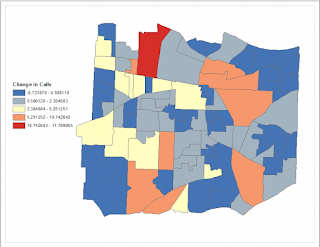
This week's lab focuses on becoming familiar with the Modifiable Area Unit Problem (MAUP) and its two effects: scale and zonation. Mainly, I learned more about how people try to manage Gerrymandering. Gerrymandering is one of the best examples of the Zonation effect in the MAUP. This involves the splitting of Counties, usually unevenly, as means to exclude certain demographics to gain favor for a political party. A possible way to measure the effect it has on political districts would be to calculate how many Counties a District breaks up. Ideally, we want to lessen the amount of Counties broken up in this process. Depending on the County population, a standard measure can be established in order to even out Districts.

GIS5935 Module 13-- Effects of Scale

Image
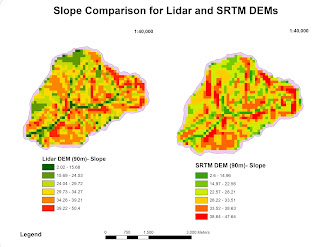
This was the first week addressing the topic of scale. The lab objective was to observe the effects of scale and resolution in spatial data properties for vector and raster data. First part of the lab required me to analyze differences in scale for hydrology features. Second, I had to compare two digital elevation models (DEMs), Lidar and SRTM, and figure out a method for comparing elevation data. I performed Slope, Aspect and Curvature analysis on the Lidar DEM at a resolution of 90m. Then performed Slope, Aspect, and Curvature analysis on the reprojected SRTM DEM also at 90m. This data allowed me to produce a chart listing averages for both DEMs in order to observe any trends. Notable inconsistencies were found in Average Slope degrees and Max elevation between the two DEMs. SRTM DEM had a lower measure at 29.4 average slope degrees, while the Lidar DEM was 31.3. Maximum elevation was higher for the Lidar DEM at 1063.05 than the SRTM DEM at 1053. DEM DEM resolution (mete...

GIS5935 Module 12-- Geographically Weighted Regression

Image
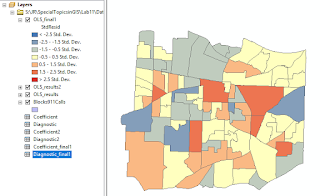
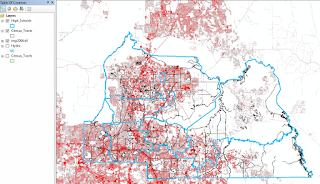
This week we were introduced to Geographically Weighted Regression (GWR). The main differences between a GWR and an Ordinary Least Squares (OLS) regression are: Where OLS is a global model, GWR is local Distances are NOT considered in OLS, whereas distances define the data fitting GWR Coefficients are constant in OLS, while in GWR they vary by location I was a lot more comfortable making these regressions and comparing for best fit variable models this time around. The lab consisted first of an example in comparing an OLS and GWR analysis and learning about the significance of differences in their prediction values. The second part another OLS and GWR analysis, this time I worked somewhat 'off-rails'. The exercise started by selecting a crime type, I chose 'Residential burglary', then making it a feature class in order to continue an analysis to find out what types of variables had the strongest correlation to high 'Residential burglary' rates in...

GIS5935 Module 11-- Multivariate Regression

Image
The goal of this week's lab is to perform a series of multivariate regression analysis, examine and work with sophisticated diagnostics, and perform a regression analysis in ArcGIS. Last week's lab exercises served as a great refresher in basic statistics and introduction to simple regression analysis, which came in extremely useful in working through this lab. It involved a higher level of statistics comprehension. I started by carrying out a multivariate regression in Excel. Then compared multivariate models created in Excel. The last part of this lab required to use ArcGIS to perform an Ordinary Least Squares (OLS) analysis and regression diagnostics. I ran the OLS and Spatial Autocorrelation (Global Moran's I) tools three times to arrive at my final results for the best fit model. According to value result guidelines, I need to use the best fit model which consist of the highest Adjusted R-square and lowest AICc values. The first model that passed in Summary 4/8 con...

GIS5935 Module 10-- Simple Regression

This lab served as a great review of basic Statistics methods, then focusing on interpreting Regressions and Correlations. We started by reviewing basic Statistical functions in Excel, such as how to calculate Average, Median, Standard Deviation, etc. Then were introduced to the Data Analysis tool in Excel, which is super helpful in performing Descriptive Statistics, Correlations, and Regressions on different data sets from the lab. I’ve only ever taken an Introduction to Statistics course in College, so much of what we covered I recall having to do by hand on graph paper and calculator, fun times!... I see now that we will likely be performing some estimates in the case of missing data points. So I’m glad we got to cover this scenario in the last exercise in which we had to fill in estimated data using the Slope formula covered in lecture. I used the Slope formula Y = b*x + a in which b is the is the Slope .84, and a is the intercept coefficient 161.83, and x was my B column val...

GIS5935 Module 9-- Accuracy

Image
This lab wraps up our modules to do with Surface analyses. Our first objective was to calculate and interpret the vertical accuracy of a DEM using NDEP accuracy guidelines. The second objective was to observe the effects of interpolation methods on a DEM's accuracy. In the first accuracy analysis sample points appeared to be laid out in clusters instead of a natural distribution in which certain Land Cover types exhibit common areas. I’m leaning towards estimated interpolation causing this type of distribution because there is a notable gap of data points in higher elevation areas. I was able to plot a total of 2387 points from a provided table using the Make XY Event Layer tool. Then clipped the data points to the DEM extent. In order to be able to perform an analyses of the DEM and the reference point dataset, I extracted elevation values from the DEM and created a new set of points using the Extract values to Points tool. Then used the Extract Multi Values to Points tool...

GIS5935 Week 8-- Surface Interpolation

Image
Interpolation is utilized in order to give a raster cell a predicted number value. We use interpolation methods to create a value for unknown values basically. This is necessary for a number of different data gathering issues such as difficult environments or complex point data that could otherwise prove difficult to measure in person. We had the opportunity to examine and perform many types of spatial interpolations in this lab such as: Thiessen Inverse Distance Weighted Spline Working with a Water Quality point data set for Tampa Bay, we were required to perform surface interpolations to examine the distribution of Biochemical Oxygen Demand (BOD) in milligrams per liter. Below is the result for Thiessen. The darker polygons represent a lower BOD concentration, while white polygons represent a high concentration. This example represents Inverse Distance Weighted interpolation. The ranges here vary from light pink, high BOD concentration, to dark green, lower B...

GIS5935 Week 7-- TINs and DEMs

Image
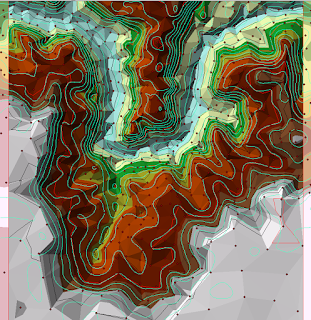
This week we explored Triangular Irregular Networks (TIN) and Digital Elevation Models (DEM) in greater detail to learn their differences, the type of applications they're typically used in, and what makes each unique when applied in a GIS analysis. I found the lab exercises to be extremely helpful in illustrating differences. For example, when you add points to represent data points to a DEM, there will be more points as opposed to a TIN which creates a point where necessary in order to highlight the most relevant data. Above is an example from an exercise which I think serves to gather a better idea of how data in TINs is distributed. The aqua contours represent contours created from a Spline done on a set of Points. Black and red contours represent TIN contours. A big difference I noticed right away was how spaced the contours created from points were in comparison to the contours from the TIN. The biggest differences appeared to be at lower elevations where the point c...

GIS5935 Week 6-- Networks: Location Allocation

Image
This week we focused on Location-Allocation modeling. This type of modeling is extremely useful in Vehicle Routing Problem (VRP) scenarios and determining the best solutions of distribution for specific areas or market targets. The lab consisted of two parts again. The first being a tutorial portion based on exercises from ESRI's ArcGIS Desktop page. The second required to perform a VRP analysis using Location-Allocation in order to adjust the assignment of market areas serviced by distribution centers throughout the U.S.

GIS5935 Week 5-- Networks: Vehicle Routing

Image
This week we focused on Vehicle Routing Problem (VRP), how they function and the many factors and parameters associated with its classes. I did not realize how much we utilize this extremely complex system of networks in our day to day lives. If you've ever used any form of transport, you've participated in a VRP. To begin, we were tasked with going through two exercises from the ArcGIS Desktop site. I added orders and depots to the VRP then running the Solve button to determine the best route assignment. After wards I had to make changes to the existing solution to resolve a different scenario, which required: to delete a route, adding route renewals, breaks, and overtime. Then once again Solve the route to determine the solution. In the second exercise, we needed to find the best routes to service paid orders using three routes for certain areas. This was fairly similar to the first practice exercise, but required for me to add pairs, specialties, create route zones, and ...

GIS5935 Week 4-- Networks: Network Analysis

Image
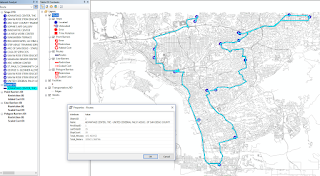
This week in Special Topics in GIS was our first week looking at Networks, we focused on Network Analysis specifically. There were two parts to the lab, the first was a set of introductory exercises to help us refresh on how to create a Network using ArcMap's Network Analyst extension tools as well as review the elements that make up a functioning Network. For the second part of the lab we modified data for provided Network. First I created a new Network Dataset with Turn Restrictions by adding RestrictedTurns and Streets feature classes to the data frame. A point shape file of Facility locations was used for Stops. There were a total of 19 Stops that resulted in a total time of 105.5 Minutes (1.76 hrs). For the final portion of the lab, I created  a second Network Dataset which included a Traffic Model. The Traffic model is enabled in the Network setup wizard and allows your network to use historic traffic data for an analysis. The map below displays the new route and...

GIS5935 Week 3-- Data Quality : Assessment

Image
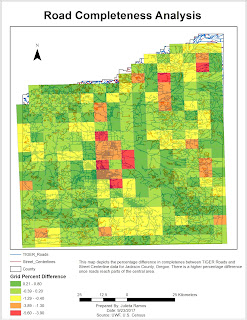
In this assignment, we learned how to determine the quality of road networks by determining their completeness by comparing total lengths of two different road data sets. Using Calculate Geometry, in kilometers, I was able to determine that TIGER roads were more complete by comparison. Total TIGER Roads length came out to be 11,383 km, while Street Centerlines were 10,805.8 km. I actually had a more difficult time organizing this analysis than initially expected. The method that seemed to work was to first clip the two roads to the grid shape file. From there run the Intersect tool on both road clips to the grid, separately of course. Then gathered the length info from each road DBF files and added it to a new excel sheet to included GRIDCODE, FID, and Lengths. In this new sheet, I then calculated the percentages using the provided formula of: % difference = (total length centerlines – total length TIGER) / total length centerlines * 100% Then I added this sheet to the TOC ...

GIS5935 Week 2-- Data Quality: Standards

Image
For this second week into standards in regards to Data Quality, we had to perform a horizontal accuracy assessment using NSSDA protocol methodology in order to determine the accuracy of two different street map data sets based off the same area in Albuquerque, New Mexico. Using two different street sample data sets: City data (ABQ_Streets) and ESRI street map data (StreetMapUSA). I started things off by creating a network data set for each street shape file in ArcMap. Next, in order to be mindful of the study area and attempt to make sure the points met the criteria, I created a fishnet with 2x2 columns/rows which creates 4 quadrants within the study area. Working off the Junction layer for ABQ_Streets, I selected 20 intersection test points as suggested. It was encouraged to use the City data set due to it being more accurate. Then comparing the selected test points, I selected matching test points for the StreetMapUSA data set. The third and final data set needed for this lab w...

GIS5935 Week 1-- Data Quality: Fundamentals

Image
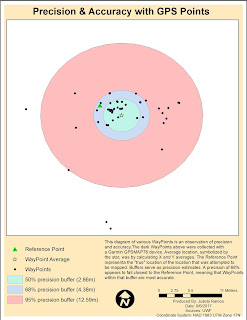
For our first lab in Special Topics in GIS we looked at what accuracy and error mean in the context of Data Quality. In this first part of the lab I calculated the average WayPoint based off WayPoints gathered from a Garmin GPSMAP76 unit in order to find the precision of a specific location. Average location was determined by calculating X and Y averages. In the diagram below, the Reference Point represents a the "true" location of the location that was attempted to be mapped. Buffers of 50%, 68% and 95% precision were also calculated to observe the precision of the data. For the second part of the lab, we had to calculate error metrics for another and larger set of GPS points and create a Cumulative Distribution Function graph showing the error distribution for all metrics.